
Licom Wallboard
Everything at a glance
For each team, you can see which agents are logged in, who is active, who is waiting, and what the individual service level is. This way, you guide your team based on facts, not feelings.

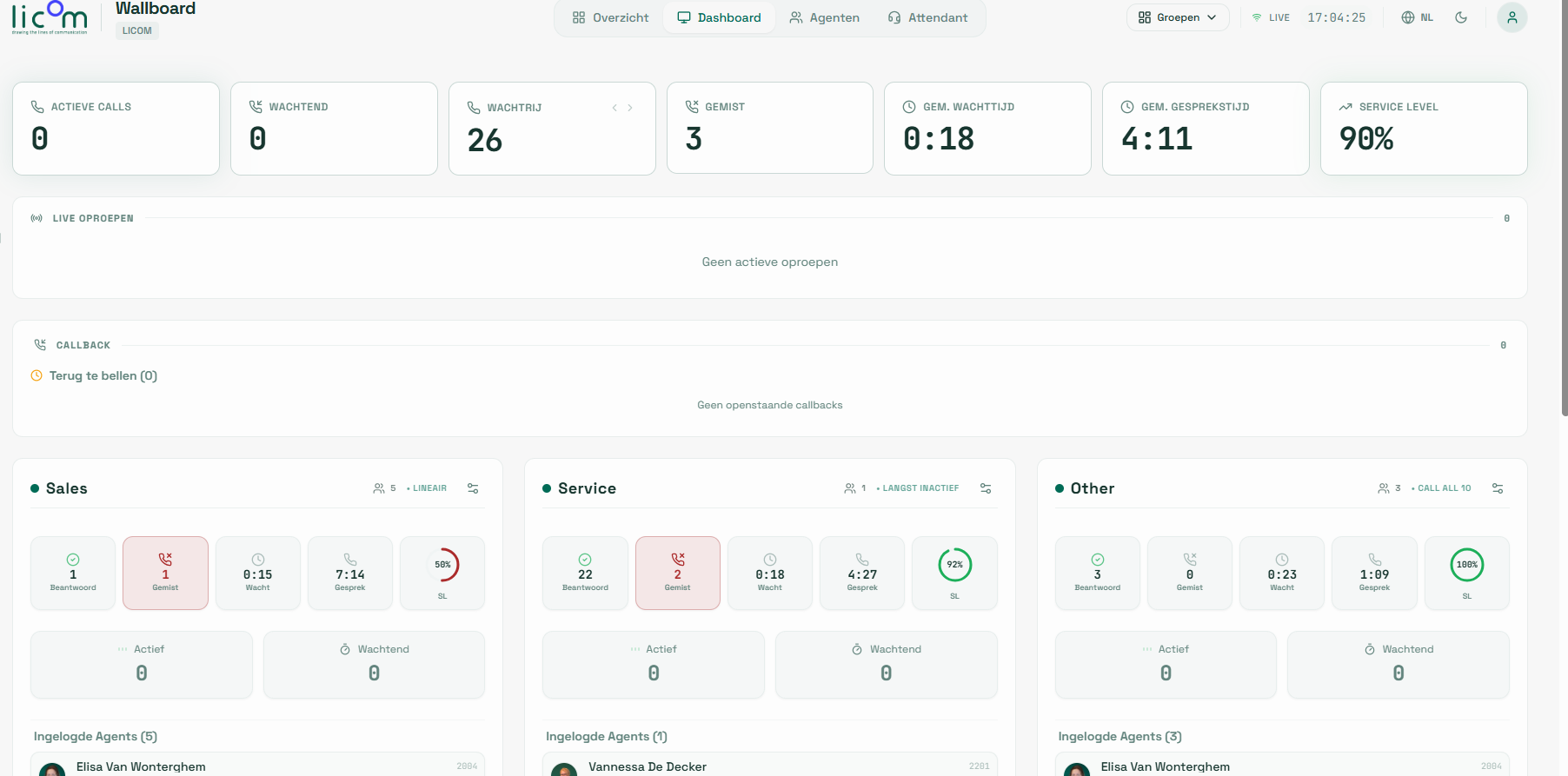
Live metrics displayed by the Wallboard
10
2
3
1
36"
3'47"
91%

What does the Wallboard show?
Live KPI dashboard
Active calls, waiting calls, queue, missed calls, avg. wait and talk time, and service level — real-time visible at the top of the screen.
Agents per team
For each team (Sales, Service, ...) you can see how many agents are logged in, who is active or waiting, and what the individual service level is.
Live calls
A separate panel shows all active calls in real-time: who is calling, which queue, and how long the call has been ongoing.
Callback management
Outstanding callbacks are displayed separately so that no callback appointment is overlooked.
Wait times & SLA
For each queue and team, you can see the average wait time and service level, allowing you to adjust immediately when necessary.
Multiple views
Switch between Overview, Dashboard, Agents, and Attendant. Configure groups and adjust the view per location or screen.